Terminals
A terminal is a physical yetipay device used to accept in-person card payments. Every terminal is linked to a site within your merchant account.
When a customer taps, inserts, or swipes their card at a terminal, the resulting transaction is attributed to the site that terminal belongs to — and settled alongside all the other payments from that site.
How terminals fit in
Merchant
 └── Site (in-person)
      └── Terminal 1
      └── Terminal 2
      └── Terminal 3
Each terminal in your estate is registered to exactly one site. You can have as many terminals as you need on a single site.
Key things to know
- Terminals belong to in-person sites. A terminal can only be linked to a site that's configured for in-person payments.
- Transactions follow the site. The terminal itself doesn't affect settlement — what matters is which site it's linked to. All terminals on the same site settle together.
- Managed through Basecamp. You register, configure, and manage your terminals through Basecamp.
- Virtual devices for testing. You don't need physical hardware to start building. Use virtual devices in the test environment to simulate terminal interactions.
Serial numbers
Each Yeti terminal has a unique serial number (sometimes referred to as a Device ID). This is permanent — it will never change — and is how you identify a specific device across Basecamp and the APIs.
Format
The serial number always consists of two parts: the model code followed by the device ID, separated by a dash. Both parts are required — the serial number isn't valid without them.
| Value | Valid? | Why |
|---|---|---|
123456789 | No | Missing model code |
000123456789 | No | Missing model code |
S1F2000123456789 | No | Missing dash separator |
S1F2-000158243352274 | Yes | Model code + dash + device ID |
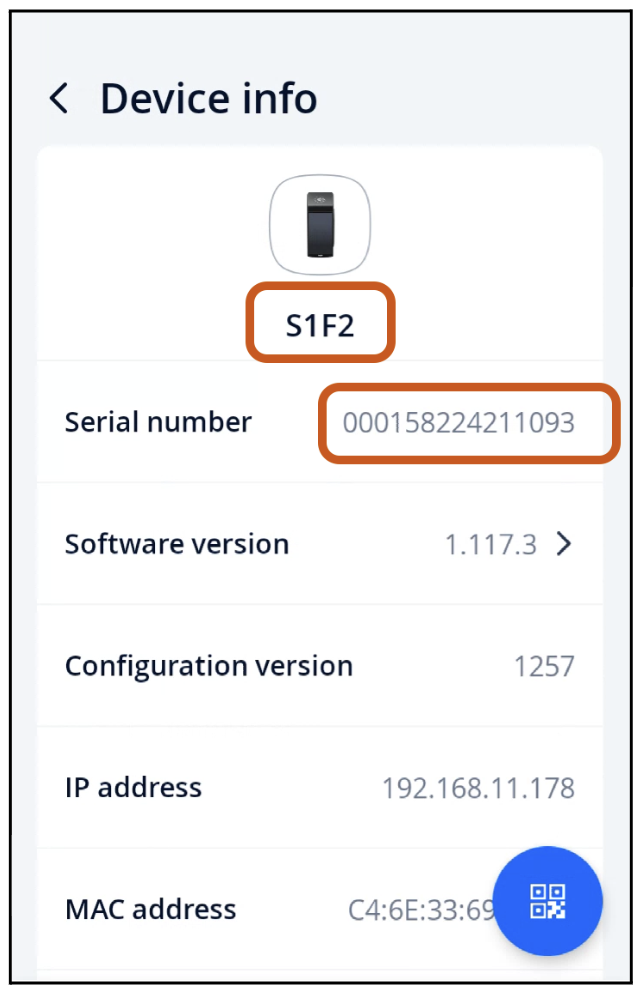
Finding it on the device
- Tap the settings icon on your Yeti.
- Tap Device Info.
- You'll see the model code and serial number listed separately — combine them with a dash to get the full serial number.
In this example the model code is S1F2 and the serial number is 00158224211093, so the full device serial is S1F2-00158224211093.
Integration options
Depending on your setup, there are different ways to interact with terminals:
| Integration | How it works |
|---|---|
| Pay At Counter | Your POS system sends a payment request to a terminal via the cloud API |
| Pay At Table | The terminal initiates the payment (e.g. tableside in a restaurant), syncing back to your POS |
| On Device (Android Intents) | Your Android app runs directly on the yetipay device and triggers payments locally |